

OpenClaw Architecture Diagram (2026): Components, Data Flow, and Security

This article is for technical evaluators, operations leads, and CTOs who want to understand how OpenClaw is actually built, not just what it does. Whether you're deciding whether to deploy OpenClaw for your team or you're preparing a technical review, this breakdown of the OpenClaw architecture diagram gives you a clear, layer-by-layer picture of the system: what components are involved, how data moves through them, and how security is handled at each stage. To adapt this architecture for your stack, work with a senior AI engineering team.
Updated July 11, 2026: added a deeper look at the OpenClaw agent architecture (the agent loop, skills, and sessions) and a system-level overview contrasting system architecture with system design.
Key takeaways
- OpenClaw uses a layered architecture: Gateway, Agent Engine, Skills, Storage.
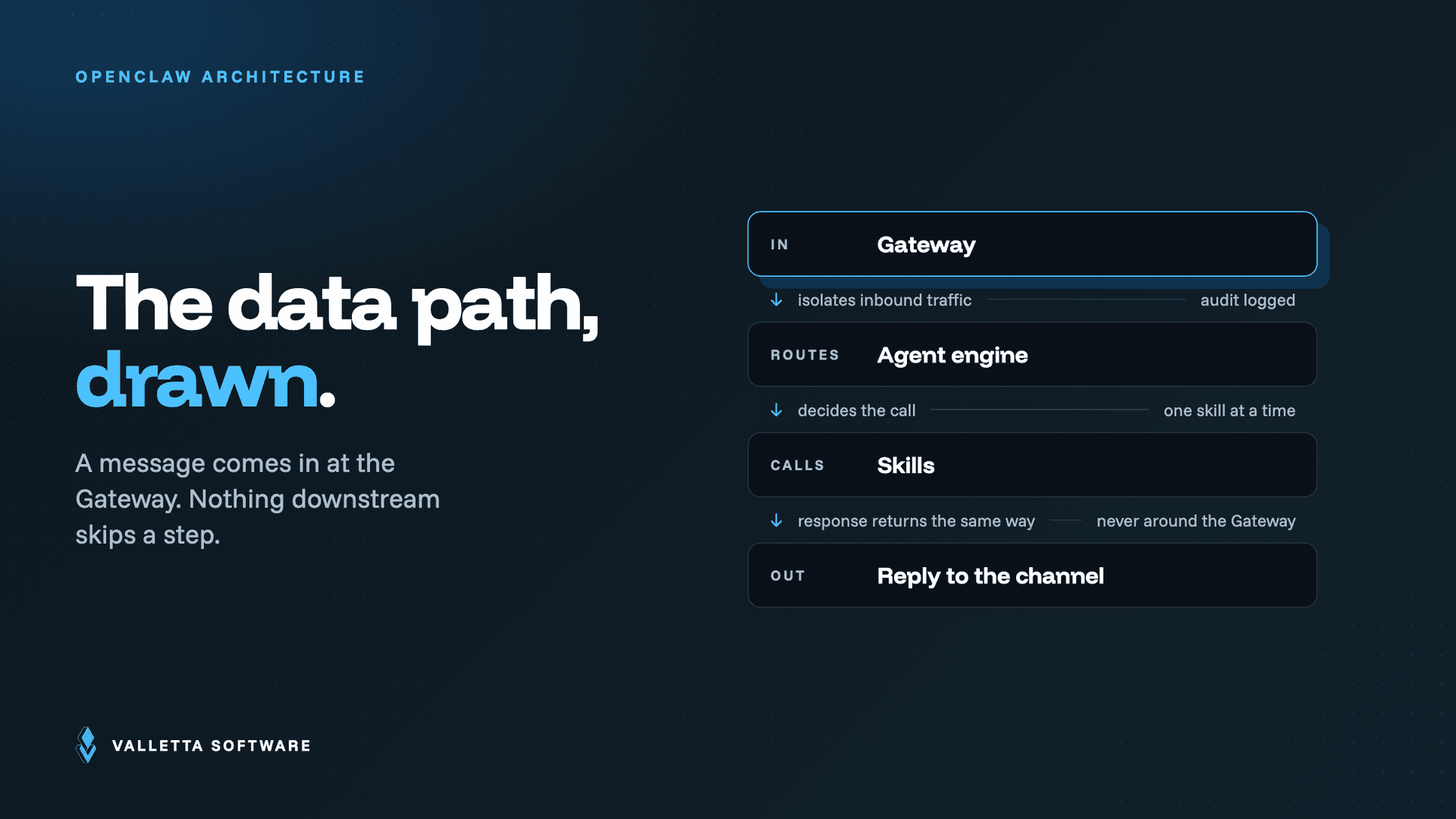
- Data flow: external message arrives at the Gateway, routes to the Agent Engine, which calls Skills, then returns a response.
- All inference happens on your own hardware; no data leaves the perimeter by default.
- Security boundaries are enforced at the Skills layer with least-privilege defaults; the same architecture supports laptop, home-server, and VPS deployment.
OpenClaw design and architecture explained
OpenClaw's design and architecture follow a local-first, five-layer model: input sources (chat apps), an integration Gateway, the agent core, an output and action layer, and external systems. Every request passes through the Gateway, which enforces authentication, authorization, and audit logging before any agent action executes.
| Layer | What it does | Key security control |
|---|---|---|
| 1. Input sources | Receives messages from Telegram, Slack, WhatsApp, email | Channel allowlists and sender verification |
| 2. Integration Gateway | Routes, validates, and logs every request | Authentication, rate limits, full audit log |
| 3. Agent core | Plans tasks and calls the model | Tool permissions and human approval gates |
| 4. Output and action layer | Executes tools, MCP servers, and skills | Sandboxed execution and MCP authorization scopes |
| 5. External systems | APIs, databases, SaaS integrations | Scoped OAuth tokens, least privilege |
Adapting this architecture for a team deployment? See the OpenClaw security hardening guide or hire AI developers who build hardened agent infrastructure.
What the OpenClaw Architecture Diagram Shows
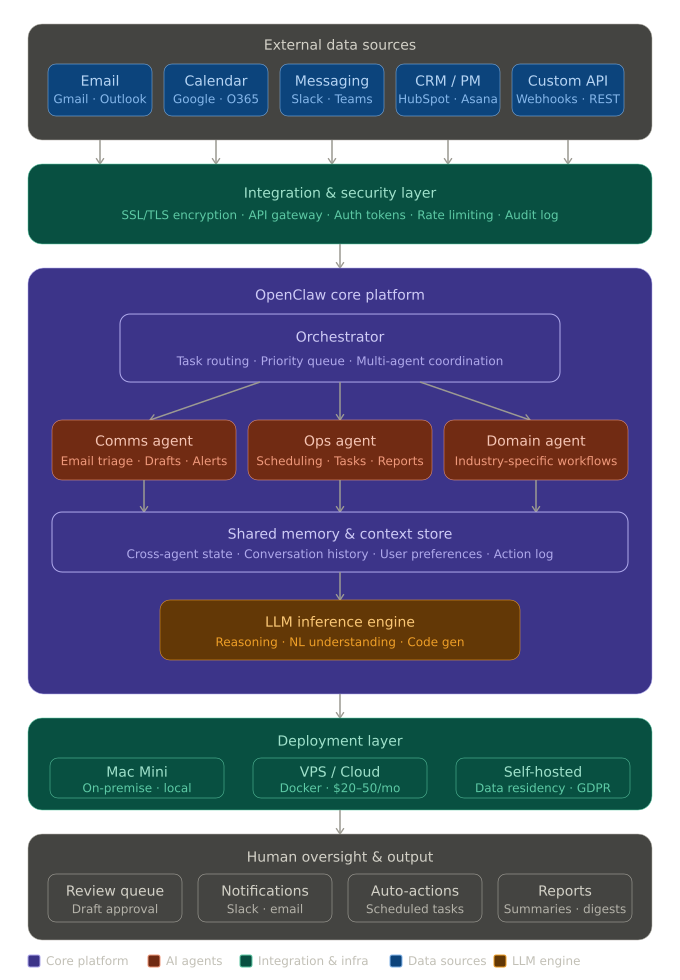
The OpenClaw system architecture is organized into five distinct horizontal layers, each with a specific role. Reading the diagram top to bottom, you move from raw inputs (your tools and data sources) through an integration gateway, into the agent processing core, then out through an action layer to the external systems that actually get updated.
This layered design is intentional. It means OpenClaw is not a single monolithic application. It's a coordinated pipeline where each layer can be deployed, updated, or secured independently.
OpenClaw Components: Layer by Layer
Layer 1: Input Sources
The top layer of the OpenClaw architecture consists of five input channels: the tools and systems your team already uses. These are the sources OpenClaw monitors continuously, including email, calendar, Slack, task management platforms, and CRM systems. No manual triggering required. OpenClaw connects to these sources and listens for events that match the workflows you've configured.
Supported input sources include Gmail, Outlook, Google Calendar, Slack, Microsoft Teams, HubSpot, Salesforce, Notion, Asana, Monday.com, and any system with an API or webhook support.
Layer 2: Integration Gateway
All incoming data passes through a single integration gateway, a unified entry point that normalizes and routes signals from different tools into a common format the agent core can process. This is the layer that makes OpenClaw tool-agnostic: whether the trigger comes from a Slack message or a new Salesforce lead, the gateway translates it into a consistent internal event.
The gateway also handles authentication and connection management for each integrated tool. If you're deploying on a VPS or Mac Mini, this is the layer that manages your Docker-based service isolation. For details on setting up this layer, see our guide on how to install OpenClaw on Mac Mini, Docker, and VPS.
Layer 3: Agent Core (the main processing engine)
This is the heart of the OpenClaw system architecture. The agent core contains four sub-components that work together:
- Orchestrator. The top-level controller that receives events from the gateway, decides which agent handles them, and manages task sequencing.
- Specialized Agents. Individual AI agents assigned to specific domains or workflows (for example, an email triage agent, a meeting scheduling agent, or a CRM update agent). In the Basic package this is one or two agents; in the Team package you get three to five. Each agent operates independently but can hand off tasks to others.
- Shared Memory Layer. A structured store that all agents can read from and write to. This is what allows agents to share context. For example, an email agent can note that a client replied, so the CRM agent updates the contact record without being explicitly triggered.
- Execution Engine. The component that translates an agent's decision into an actual action: sending an email, updating a record, posting a Slack message, or creating a calendar event.
Layer 4: Output / Action Layer
Once the execution engine has determined what action to take, the output layer handles delivery. This layer routes the action to the correct destination: a message back to a user, a record update in an external system, or a notification sent to a Slack channel. It also enforces any human-in-the-loop checkpoints configured for critical actions (for example, drafting an email for review rather than sending it directly).
Layer 5: External Systems
The bottom layer represents the external platforms and tools that OpenClaw writes back to: your CRM, calendar, communication tools, project management systems, and any custom APIs. This layer is read-write. OpenClaw both pulls data from these systems (via Layer 1) and pushes updates to them (via Layer 4).
OpenClaw Data Flow: Step by Step
Here's how data moves through the system in a typical automation cycle:
- Event is detected. A trigger occurs in one of the connected input sources: a new email arrives, a Slack message is posted, a calendar event is created, or a form is submitted.
- Gateway normalizes the signal. The integration gateway receives the raw event, authenticates the source, and converts it into a standardized internal format that the agent core can process regardless of which tool sent it.
- Orchestrator assigns the task. The orchestrator receives the normalized event and decides which agent is responsible for handling it, based on the workflow rules configured during setup.
- Agent processes the event. The assigned agent analyzes the event, reads relevant context from shared memory (such as prior interactions with the same contact), and determines the appropriate response or action.
- Shared memory is updated. Before taking action, the agent writes its findings and decisions back to shared memory so other agents have up-to-date context for any related tasks.
- Execution engine prepares the action. The execution engine translates the agent's decision into a concrete operation: an API call, a message payload, or a record update.
- Output layer delivers the action. The action is sent to the target external system. If a human review checkpoint is configured, the action is queued for approval before delivery. All actions are logged for audit purposes.
This entire cycle runs in the background, 24/7, without manual intervention. For a fuller picture of how this translates into real workflows, see the OpenClaw 2026 complete guide.
OpenClaw agent architecture: the agent loop, skills, and sessions
The OpenClaw agent architecture lives inside the agent core (Layer 3), and it is best read as a loop rather than a static box. When the gateway hands a normalized event to the orchestrator, the orchestrator decides which specialized agent owns that workflow and where it sits in the task sequence. That routing decision is the start of every agent loop.
The assigned agent then runs a read, decide, act cycle. It reads relevant context from the shared memory layer (for example, prior messages with the same contact), decides on a response, writes its findings back to shared memory so sibling agents stay current, and hands the decision to the execution engine. The execution engine is where skills run: sending an email, updating a record, or posting to Slack are each discrete skills the engine invokes. Because agents coordinate through shared memory rather than direct calls, an email triage agent and a CRM agent can pass work to each other without either being triggered by hand.
Sessions, in this model, are the shared memory context that carries across a workflow. State does not live inside a single agent; it lives in the common store, which is why the same architecture scales from one or two agents in a small deployment to three to five specialized agents running in parallel under the orchestrator. To turn this architecture into a running instance, follow the OpenClaw setup guide.
OpenClaw system architecture vs system design: a quick overview
Searches for OpenClaw system architecture, an architecture overview, or OpenClaw system design are usually after two related but distinct answers. The system architecture is the structure: the five horizontal layers, from input sources through the integration gateway, agent core, and output layer to the external systems. It says what the parts are and how they connect. The system design is the set of decisions about how those parts are deployed and constrained: which deployment model you run, where human approval gates sit, and how tightly each integration is scoped.
Read as an overview, the whole system is one directional pipeline. Events enter at the top, the gateway normalizes and authenticates them, the agent core plans and acts, and the output layer writes results back to external systems with every action logged. Because each layer is independent, you can deploy, update, or secure one without rebuilding the others, which is what lets the same design run on a laptop, a home server, or a VPS. The choices that separate a good deployment from a fragile one are mostly security choices: least-privilege credentials per integration, human checkpoints on irreversible actions, and encryption in transit and at rest. Teams tightening those controls should read the OpenClaw security hardening guide.
OpenClaw Security: The Basics
OpenClaw security operates at multiple layers of the architecture, not just at the perimeter.
- SSL encryption in transit. All data moving between input sources, the gateway, and external systems is encrypted using SSL. This applies to every connection, inbound and outbound.
- Encryption at rest. Data stored in the shared memory layer and local configuration is encrypted at rest. Your credentials and workflow configurations are not stored in plain text.
- Automated backups. The system runs automated backups on a configurable schedule. If a deployment needs to be restored, the configuration and state can be recovered without rebuilding from scratch.
- Human oversight on critical actions. Any action flagged as high-risk (sending external emails, updating financial records, or modifying access permissions) can be routed through a human approval step before execution. This is configurable per workflow.
- Full audit logs. Every action taken by every agent is logged. You can review what happened, when, and why. This is useful for compliance reviews and for debugging unexpected behavior.
- No third-party data sharing. Your data is not shared with any third parties and is not used to train any external models.
- Self-hosted deployment option. For teams with strict data residency requirements, OpenClaw can be deployed entirely on your own infrastructure. No data leaves your environment.
For organizations with formal compliance requirements (GDPR, HIPAA, or similar), a Security Audit add-on is available. The Standard tier covers infrastructure review and data handling assessment; the Advanced tier includes a full compliance gap analysis and a remediation plan.
Practical Implementation Advice
A few things that make OpenClaw deployments go smoothly in practice:
- Start with one well-defined workflow. Don't try to automate everything on day one. Pick one high-frequency, low-risk process (email triage, meeting scheduling, or Slack task tracking) and get that working cleanly before expanding. The Basic package is designed exactly for this: one or two agents, two integrations, a fast setup.
- Map your tool stack before setup. The integration gateway needs credentials and access for each connected tool. Have your API keys, OAuth tokens, and admin access ready before the configuration session to avoid delays.
- Configure human checkpoints for anything irreversible. Email sends, CRM record deletions, and external notifications should all have a review step until you've validated the agent's behavior in your specific context.
- Use audit logs during the first two weeks. Review the action log regularly in the early weeks after launch. It's the fastest way to catch misconfigured workflows before they cause problems at scale.
- Choose your deployment model early. Cloud-hosted (managed by Valletta Software) is the fastest way to get started and runs at approximately $20-50/month in server costs. VPS and self-hosted options are available if you have data residency or security requirements. This decision affects the setup process, so it should be made before implementation begins.
Frequently Asked Questions
What is the OpenClaw architecture based on?
OpenClaw uses a layered, multi-agent architecture. Input sources feed into a centralized integration gateway, which routes events to a core engine containing an orchestrator, specialized agents, shared memory, and an execution layer. Output is delivered back to external systems through an action layer. The system is designed to run proactively in the background. It does not wait for a user to ask it something.
How is OpenClaw different from a chatbot?
A chatbot responds when you ask it something. OpenClaw monitors your connected tools continuously and takes action on its own when the right conditions are met: scheduling a meeting, triaging an inbox, updating a CRM record, without you having to initiate anything. It's a proactive automation platform, not a conversational interface.
Can multiple agents share information with each other?
Yes. The shared memory layer in the agent core is specifically designed for this. Agents read from and write to a common context store, which means one agent's findings are immediately available to others. This is what enables coordinated multi-agent workflows. For example, an email agent detecting a client request and a CRM agent automatically updating the contact record based on that information.
What deployment options are available?
Three options: cloud-hosted (managed by Valletta Software, approximately $20-50/month in server costs), VPS (Docker-based, client-accessible from anywhere), and self-hosted on-premise (for strict data residency requirements). The right choice depends on your security posture and infrastructure preferences. See our installation guide for Mac Mini, Docker, and VPS for technical setup details.
Is it possible to add a human approval step before an agent takes action?
Yes, and it's recommended for any irreversible actions. The output layer supports configurable human-in-the-loop checkpoints. The agent prepares the action, routes it for human review, and only executes after approval. This applies to things like sending external emails, modifying financial records, or updating access permissions.
What tools can connect to OpenClaw?
The integration gateway supports Slack, Microsoft Teams, Discord, WhatsApp, Telegram, Gmail, Outlook, Office 365, Google Calendar, Notion, Asana, Trello, Monday.com, Salesforce, HubSpot, and any system with an API or webhooks. Industry-specific platforms (property management software, ERP systems, etc.) can be connected through custom integration work.
How are audit logs used?
Every action taken by every agent is recorded in an audit log: what happened, which agent did it, and when. Logs are used for compliance verification, operational review, and debugging. For teams with formal compliance requirements, the Advanced Security Audit add-on includes a full review of how logs are structured and retained.
How many agents can run simultaneously?
This depends on the package. The Basic package supports one to two agents. The Team package supports three to five specialized agents running in parallel, coordinated by the orchestrator. Corporate and Enterprise deployments are scoped individually and can support larger multi-agent configurations across departments. For a full comparison, see the OpenClaw 2026 guide.
Conclusion
The OpenClaw architecture is built around a clear principle: AI agents should act proactively on your behalf, not wait to be asked. The five-layer design, from input sources through the integration gateway, agent core, output layer, and external systems, gives you a system that is modular, auditable, and deployable across a range of infrastructure environments.
If you're evaluating OpenClaw for your team, the best next step is a scoped conversation about your specific workflows and tool stack. The Basic package is a fast, contained way to validate the platform before committing to a larger rollout, and the Discovery package fee is credited toward any implementation you choose afterward.
Want to see how OpenClaw fits your specific setup? Book a discovery call with the Valletta Software team and we'll map your workflows to the right architecture before you commit to anything.
Frequently asked questions
- What does the OpenClaw architecture diagram show?
- The OpenClaw architecture diagram shows the four-component model: user input enters the agent runtime, which calls the skill library; outbound calls go through the gateway with policy enforcement; observability records every prompt, output and tool call for audit.
- How does data flow through an OpenClaw system?
- User input hits the agent runtime, the runtime selects skills based on the system prompt and tool registry, skills call external APIs through the gateway with scoped credentials, results return to the runtime, and the observability layer logs the full chain.
- What security boundaries does the OpenClaw diagram enforce?
- The gateway is the security boundary for outbound calls. Skills can only act through it, credentials are scoped per skill, and the observability layer captures every prompt and tool call for audit and compliance.
- Where does multi-tenant OpenClaw fit in the diagram?
- Multi-tenant deployments add tenant identifiers to every prompt, route credentials per tenant, and segregate observability indices. The core diagram does not change; the gateway and observability layers gain tenant-aware routing.
- How can a team adapt the OpenClaw architecture for their stack?
- Replace the gateway with the team's existing API gateway (Kong, Tyk, AWS API Gateway), wire observability into the team's tracing stack (OpenTelemetry, Datadog), and ship skills as standard Python or TypeScript packages.
Adapt the OpenClaw Architecture for Your Product
Valletta Software helps SaaS and enterprise teams plug OpenClaw into their existing API gateway, tracing stack and security boundaries. Senior AI engineers, EU contract.